Evolutionary Algorithm
Krkn-AI uses an online learning approach by leveraging an evolutionary algorithm, where an agent runs tests on the actual cluster and gathers feedback by measuring various KPIs for your cluster and application. The algorithm begins by creating random population samples that contain Chaos scenarios. These scenarios are executed on the cluster, feedback is collected, and then the best samples (parents) are selected to undergo crossover and mutation operations to generate the next set of samples (offspring). The algorithm relies on heuristics to guide the exploration and exploitation of scenarios.
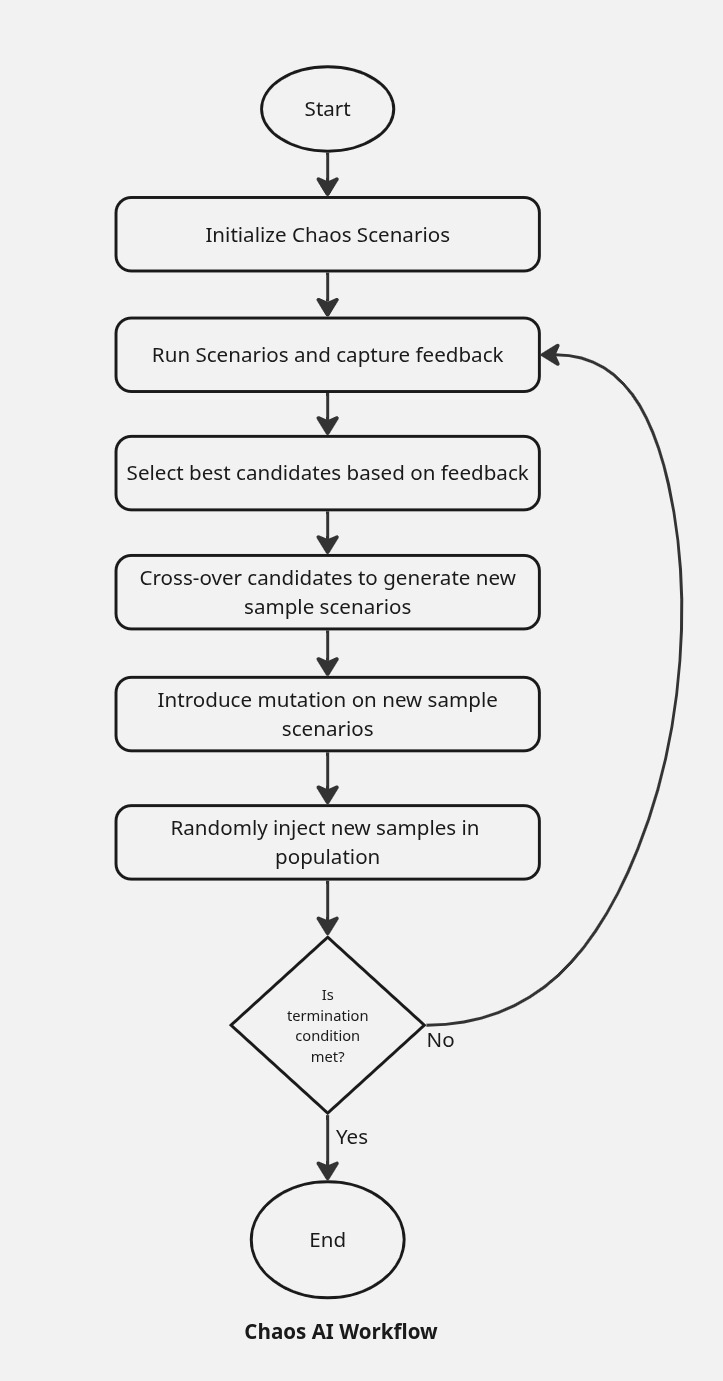
Terminologies
- Generation: A single iteration or cycle of the algorithm during which the population evolves. Each generation produces a new set of candidate solutions.
- Population: The complete set of candidate solutions (individuals) at a given generation.
- Sample (or Individual): A single candidate solution within the population, often represented as a chromosome or genome. In our case, this is equivalent to a Chaos experiment.
- Selection: The process of choosing individuals from the population (based on fitness) to serve as parents for producing the next generation.
- Crossover: The operation of combining two Chaos experiments to produce a new scenario, encouraging the exploration of new solutions.
- Mutation: A random alteration of parts of a Chaos experiment.
- Scenario Mutation: The scenario itself is changed to a different one, introducing greater diversity in scenario execution while retaining the existing run properties.
- Composition: The process of combining existing Chaos experiments into a grouped scenario to represent a single new scenario.
- Population Injection: The introduction of new individuals into the population to escape stagnation.
Algorithm Selector
algorithm
Selects which optimization engine to use. (Default: genetic)
Currently the only supported value is genetic. The architecture is designed to support future engines — each engine gets its own config section.
algorithm: genetic
Configurations
The algorithm relies on specific configurations to guide its execution. These settings live under the genetic: section of the Krkn-AI config file, which you generate using the discover command.
Backward compatibility: Config files using the old flat layout (GA fields at root level) are still supported — they are automatically migrated on load.
algorithm: genetic

genetic:
  generations: 20
  population_size: 10
  mutation_rate: 0.7
  scenario_mutation_rate: 0.6
  crossover_rate: 0.6
  composition_rate: 0.0
  selection_strategy: "roulette"
  # tournament_size: 3
  population_injection_rate: 0.0
  population_injection_size: 2
  adaptive_mutation:
    enable: false
  # stopping_criteria:
  #   fitness_threshold: 200
genetic.generations
Total number of generation loops to run. (Default: 20)
- The value for this field should be at least 1.
- Setting this to a higher value increases Krkn-AI testing coverage.
- Each scenario tested in the current generation retains some properties from the previous generation.
- Mutually exclusive with
duration— set one or the other.
genetic.duration
Maximum time (in seconds) the algorithm should run. (Default: disabled)
- When set, the algorithm runs until the duration elapses instead of counting generations.
- Mutually exclusive with
generations— set one or the other.
genetic.population_size
Minimum population size in each generation. (Default: 10)
- The value for this field should be at least 2.
- Setting this to a higher value will increase the number of scenarios tested per generation, which is helpful for running diverse test samples.
- A higher value is also preferred when you have a large set of objects in cluster components and multiple scenarios enabled.
- If you have a limited set of components to be evaluated, you can set a smaller population size and fewer generations.
genetic.crossover_rate
How often crossover should occur for each scenario parameter. (Default: 0.6; Range: [0.0, 1.0])
- A higher crossover rate increases the likelihood that a crossover operation will create two new candidate solutions from two existing candidates.
- Setting the crossover rate to
1.0ensures that crossover always occurs during selection process.
genetic.mutation_rate
How often mutation should occur for each scenario parameter. (Default: 0.7; Range: [0.0, 1.0])
- This helps to control the diversification among the candidates. A higher value increases the likelihood that a mutation operation will be applied.
- Setting this to
1.0ensures persistent mutation during the selection process.
genetic.scenario_mutation_rate
How often a mutation should result in a change to the scenario. (Default: 0.6; Range: [0.0, 1.0])
- A higher rate increases diversity between scenarios in each generation.
- A lower rate gives priority to retaining the existing scenario across generations.
genetic.composition_rate
How often a crossover would lead to composition. (Default: 0.0; Range: [0.0, 1.0])
- By default, this value is disabled, but you can set it to a higher rate to increase the likelihood of composition.
genetic.selection_strategy
Strategy used to select parents for the next generation. (Default: roulette)
roulette— Fitness-proportionate selection. Higher-fitness individuals have a greater probability of being selected.tournament— Randomly selects a subset of individuals and picks the best. Usetournament_sizeto control the subset size.
genetic.tournament_size
Number of individuals competing in each tournament round when selection_strategy is set to tournament. (Default: 3)
genetic.population_injection_rate
How often random samples get newly added to the population. (Default: 0.0; Range: [0.0, 1.0])
- A higher injection rate increases the likelihood of introducing new candidates into the existing generation.
genetic.population_injection_size
Size of random samples that get added to the new population. (Default: 2)
- A higher injection size means that more diversified samples get added during the evolutionary algorithm loop.
- This is beneficial if you want to start with a smaller population test set and then increase the population size as you progress through the test.
genetic.adaptive_mutation
Dynamically adjusts the mutation rate based on fitness convergence. When enabled, the mutation rate automatically increases when the population stagnates and decreases when progress is being made.
genetic:
  adaptive_mutation:
    enable: false       # Enable adaptive mutation (Default: false)
    min: 0.05           # Minimum mutation rate (Default: 0.05)
    max: 0.9            # Maximum mutation rate (Default: 0.9)
    threshold: 0.1      # Fitness improvement threshold to detect stagnation (Default: 0.1)
    generations: 5      # Number of generations to look back for stagnation (Default: 5)
genetic.stopping_criteria
Configuration for advanced stopping conditions based on fitness, saturation, or exploration limits. See Stopping Criteria for full details.
Top-Level Settings
The following fields remain at the top level of the config file (outside the genetic: section):
wait_duration
Time to wait after scenario execution. Sets Krkn’s --wait-duration parameter. (Default: 120 seconds)